

搜索到
387
篇与
moonjerx
的结果
-
 docker运行的所有服务无法远程访问 问题描述{alert type="info"} 在新安装的 ubuntu server 22.0.4 系统过程中本来勾选了安装 docker stable 版本,但实际上进入系统后却没有安装 docker 。只能通过 sudo apt-get install -y docker.io 安装。 安装成功后安装了 mysql 8.0.26 镜像容器和 gitlab 镜像容器,本地使用 telnet 127.0.0.1 3306 是通的,且进入容器内用 root 账户登录也正常,说明容器服务是正常的。但是局域网内其他设备却无法连通 mysql 服务。并非本地主机或者局域网远程主机防火墙阻挡,因为 22 端口是可以正常访问的,且本地防火墙状态全关。 最后解决问题了,知道问题是docker的虚拟网关存在问题。{/alert}一、网上参考解决方案原因:docker网卡地址冲突sudo apt-get install -y bridge-utils设置网卡信息sudo service docker stop sudo ip link set dev docker0 down sudo brctl delbr docker0 sudo iptables -t nat -F POSTROUTING sudo brctl addbr docker0 sudo ip addr add 172.17.0.1/24 dev docker0 sudo ip link set dev docker0 up 二、实际解决问题修改 daemon.json 文件centos上安装后有此文件,但是 ubuntu 上需要自己创建文件。vi /etc/docker/daemon.json示例: { "registry-mirrors": [ "https://cqiunwxe.mirror.aliyuncs.com", "https://registry.docker-cn.com", "http://hub-mirror.c.163.com", "https://docker.mirrors.ustc.edu.cn", "https://cr.console.aliyun.com", "https://mirror.ccs.tencentyun.com" ], "bip": "172.16.10.1/24" }重载配置并重启docker服务sudo systemctl daemon-reload && sudo systemctl restart docker
 -
-
ubuntu安装、使用docker方法 一、安装1、查看内核uname -r2、更新包sudo apt-get update3、没有docker旧版本,忽略这一步。如果有则需要卸载旧的版本,主要为了防止新旧版本冲突sudo apt-get remove docker docker-engine docker.io containerd runc4、为了防止 apt 源使用 HTTPS 以确保软件下载过程中不被篡改。我们需要添加使用 HTTPS 传输的软件包及 CA 证书sudo apt-get install apt-transport-https ca-certificates curl gnupg lsb-release5、确认下载软件包的合法性,需要添加软件源的 GPG 密钥,但因网络问题设置docker源改为国内源(阿里)curl -fsSL https://mirrors.aliyun.com/docker-ce/linux/ubuntu/gpg | sudo gpg --dearmor -o /usr/share/keyrings/docker-archive-keyring.gpg或curl -fsSL http://mirrors.aliyun.com/docker-ce/linux/ubuntu/gpg | sudo apt-key add -6、向 source.list 中添加 Docker CE 软件源sudo add-apt-repository "deb [arch=amd64] http://mirrors.aliyun.com/docker-ce/linux/ubuntu $(lsb_release -cs) stable"或使用https://mirrors.ustc.edu.cn源(失效)sudo add-apt-repository "deb [arch=armhf] https://mirrors.ustc.edu.cn/docker-ce/linux/raspbian $(lsb_release -cs) stable"7、安装sudo apt-get -y install docker.io或sudo apt-get install docker-ce docker-ce-cli containerd.io启动dockersudo systemctl start dockerdocker换源修改 /etc/docker/daemon.json (如果该文件不存在,则创建){ "registry-mirrors": [ "https://hub-mirror.c.163.com" ] }sudo systemctl daemon-reload && sudo systemctl restart docker添加用户到docker用户组
-
shell命令:判断文件或目录是否存在 一、文件比较符-e filename 如果 filename 存在,则为真-d filename 如果 filename 为目录,则为真-f filename 如果 filename 为常规文件,则为真-L filename 如果 filename 为符号链接,则为真-r filename 如果 filename 可读,则为真-w filename 如果 filename 可写,则为真-x filename 如果 filename 可执行,则为真 -s filename 如果 文件长度不为0,则为真 -h filename 如果 文件是软链接,则为真-O filename 如果 filename 存在,并且属于当前用户,则为真-G filename 如果 filename 存在,并且属于当前用户组,则为真-nt 判断file1是否比file2新 ["/data/file1" -nt"/data/file2" ]-ot 判断file1是否比file2旧 ["/data/file1" -ot"/data/file2" ]二、常用例子1,文件夹不存在则创建if [ ! -d "/data/" ]; then mkdir /data else echo "文件夹已经存在" fi2,文件存在则删除if [ ! -f "/data/filename" ]; then echo "文件不存在" else rm -f /data/filename fi3,判断文件是否存在,不存在则创建if [ ! -f "$file" ]; then touch "$file" fi4,文件夹是否存在if [ -d "/data/" ]; then echo "文件夹存在" else echo "文件夹不存在" fi
-
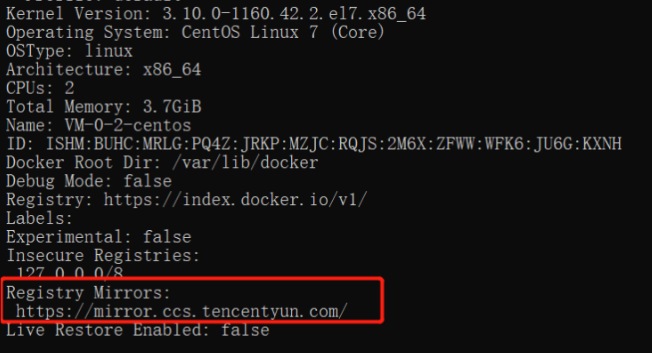
docker更换国内镜像源 通过配置文件启动Docker,修改 /etc/docker/daemon.json 文件并添加上 registry-mirrors 键值。sudo vim /etc/docker/daemon.json{ "registry-mirrors" : [ "https://registry.docker-cn.com", "http://hub-mirror.c.163.com", "https://docker.mirrors.ustc.edu.cn", "https://cr.console.aliyun.com", "https://mirror.ccs.tencentyun.com" ] }sudo service docker restart sudo systemctl daemon-reload #重载配置 sudo systemctl restart docker #重启docker查看配置是否成功:docker infoRegistry Mirrors:有截图中框起来的就说明配置成功。Docker中国区官方镜像:https://registry.docker-cn.com网易:http://hub-mirror.c.163.comustc:https://docker.mirrors.ustc.edu.cn中国科技大学:https://docker.mirrors.ustc.edu.cn阿里云:https://cr.console.aliyun.com/阿里云:https://<你的ID>.mirror.aliyuncs.com(打开此地址登录你的阿里云账号获取你的专属镜像源https://cr.console.aliyun.com/#/accelerator)腾讯云:https://mirror.ccs.tencentyun.com科大镜像:https://docker.mirrors.ustc.edu.cn/七牛云加速器:https://reg-mirror.qiniu.com




您的IP: