

搜索到
388
篇与
moonjerx
的结果
-
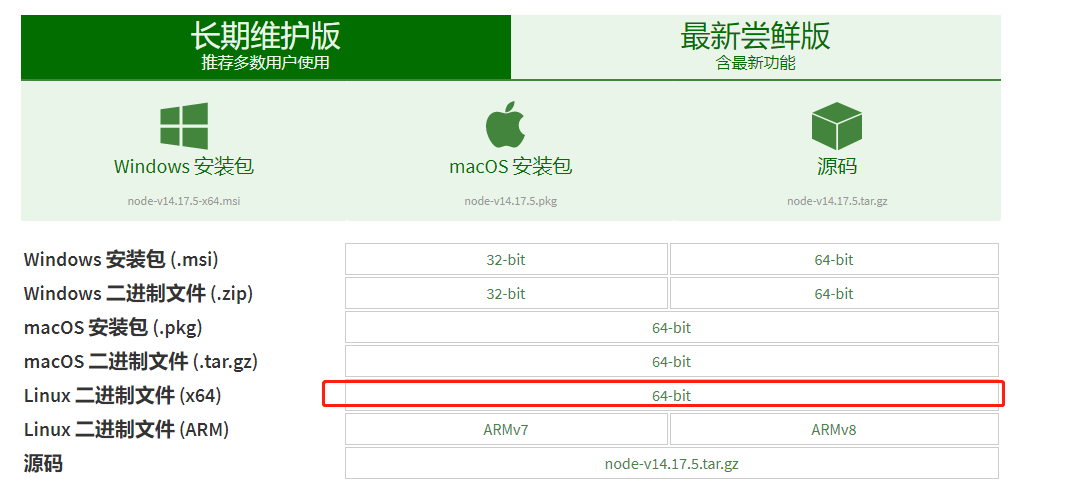
 CentOS安装NodeJS 1.从官网下载最新nodejs安装包https://nodejs.org/zh-cn/download/ 历史版本可从https://nodejs.org/dist/下载2.通过ftp工具上传到linux服务,解压安装包或者在指定目录下执行命令下载:wget https://nodejs.org/dist/v14.17.5/node-v14.17.5-linux-x64.tar.xz解压:tar -xvf node-v14.17.5-linux-x64.tar.xz3、移动并改名文件夹(不改名也行)cd /usr/local/ mv /var/ftp/pub/node-v14.17.5-linux-64 . //后面的.表示移动到当前目录 mv node-v14.17.5-linux-x64 nodejs4、让npm和node命令全局生效方式一:环境变量方式(这种方式似乎只对登录用户有效?)1)、加入环境变量,在 /etc/profile 文件末尾增加配置vi /etc/profile export PATH=$PATH:/usr/local/nodejs/bin2)、执行命令使配置文件生效source /etc/profile方式二:软链接方式(推荐)ln -s /usr/local/nodejs/bin/npm /usr/local/bin/ ln -s /usr/local/nodejs/bin/node /usr/local/bin/5、查看nodejs是否安装成功node -v npm -v
-
小说站-维护-清理无效小说存储 1.清理指定id的小说所有内容DROP PROCEDURE IF EXISTS clear_invalid_novel; CREATE PROCEDURE clear_invalid_novel() BEGIN DECLARE bookid varchar(255) DEFAULT '1431094810327994368'; DELETE FROM book_content WHERE index_id in (SELECT id FROM book_index WHERE book_id=bookid); DELETE FROM book_content0 WHERE index_id in (SELECT id FROM book_index WHERE book_id=bookid); DELETE FROM book_content1 WHERE index_id in (SELECT id FROM book_index WHERE book_id=bookid); DELETE FROM book_content2 WHERE index_id in (SELECT id FROM book_index WHERE book_id=bookid); DELETE FROM book_content3 WHERE index_id in (SELECT id FROM book_index WHERE book_id=bookid); DELETE FROM book_content4 WHERE index_id in (SELECT id FROM book_index WHERE book_id=bookid); DELETE FROM book_content5 WHERE index_id in (SELECT id FROM book_index WHERE book_id=bookid); DELETE FROM book_content6 WHERE index_id in (SELECT id FROM book_index WHERE book_id=bookid); DELETE FROM book_content7 WHERE index_id in (SELECT id FROM book_index WHERE book_id=bookid); DELETE FROM book_content8 WHERE index_id in (SELECT id FROM book_index WHERE book_id=bookid); DELETE FROM book_content9 WHERE index_id in (SELECT id FROM book_index WHERE book_id=bookid); DELETE FROM book_index WHERE book_id=bookid; DELETE FROM book WHERE id=bookid; END; call clear_invalid_novel();2.删除无效的小说文本delete from book_content where index_id not in(SELECT id from book_index); delete from book_content0 where index_id not in(SELECT id from book_index); delete from book_content1 where index_id not in(SELECT id from book_index); delete from book_content2 where index_id not in(SELECT id from book_index); delete from book_content3 where index_id not in(SELECT id from book_index); delete from book_content4 where index_id not in(SELECT id from book_index); delete from book_content5 where index_id not in(SELECT id from book_index); delete from book_content6 where index_id not in(SELECT id from book_index); delete from book_content7 where index_id not in(SELECT id from book_index); delete from book_content8 where index_id not in(SELECT id from book_index); delete from book_content9 where index_id not in(SELECT id from book_index);3.整合表内容create table book_content_test as SELECT id, index_id,content from ( SELECT * FROM book_content0 B0 WHERE B0.index_id in (SELECT id FROM book_index WHERE book_id='1431142380391714816') union all SELECT * FROM book_content1 B1 WHERE B1.index_id in (SELECT id FROM book_index WHERE book_id='1431142380391714816') union all SELECT * FROM book_content2 B2 WHERE B2.index_id in (SELECT id FROM book_index WHERE book_id='1431142380391714816') union all SELECT * FROM book_content3 B3 WHERE B3.index_id in (SELECT id FROM book_index WHERE book_id='1431142380391714816') union all SELECT * FROM book_content4 B4 WHERE B4.index_id in (SELECT id FROM book_index WHERE book_id='1431142380391714816') union all SELECT * FROM book_content5 B5 WHERE B5.index_id in (SELECT id FROM book_index WHERE book_id='1431142380391714816') union all SELECT * FROM book_content6 B6 WHERE B6.index_id in (SELECT id FROM book_index WHERE book_id='1431142380391714816') union all SELECT * FROM book_content7 B7 WHERE B7.index_id in (SELECT id FROM book_index WHERE book_id='1431142380391714816') union all SELECT * FROM book_content8 B8 WHERE B8.index_id in (SELECT id FROM book_index WHERE book_id='1431142380391714816') union all SELECT * FROM book_content9 B9 WHERE B9.index_id in (SELECT id FROM book_index WHERE book_id='1431142380391714816') ) as T1;
-
mysql执行存储过程 示例1-- 创建存储过程之前需判断该存储过程是否已存在,若存在则删除 DROP PROCEDURE IF EXISTS init_reportUrl; -- 创建存储过程 CREATE PROCEDURE init_reportUrl() BEGIN -- 定义变量 DECLARE s int DEFAULT 0; DECLARE report_id varchar(255); DECLARE report_url varchar(256); -- 定义游标,并将sql结果集赋值到游标中 DECLARE report CURSOR FOR select reportId,reportUrl from patrolReportHistory; -- 声明当游标遍历完后将标志变量置成某个值 DECLARE CONTINUE HANDLER FOR NOT FOUND SET s=1; -- 打开游标 open report; -- 将游标中的值赋值给变量,注意:变量名不要和返回的列名同名,变量顺序要和sql结果列的顺序一致 fetch report into report_id,report_url; -- 当s不等于1,也就是未遍历完时,会一直循环 while s<>1 do -- 执行业务逻辑 update patrolreporthistory set reportUrl = CONCAT('patrolReport.html?monitorId=',substring(report_url,15,1),'&reportId=',report_id) where reportId=report_id; -- 将游标中的值再赋值给变量,供下次循环使用 fetch report into report_id,report_url; -- 当s等于1时表明遍历以完成,退出循环 end while; -- 关闭游标 close report; END;-- 执行存储过程 call init_reportUrl()示例2-- 创建存储过程之前需判断该存储过程是否已存在,若存在则删除 DROP PROCEDURE IF EXISTS sys_config_uniform_price; -- 创建存储过程 CREATE PROCEDURE sys_config_uniform_price() BEGIN -- 定义变量 DECLARE exe_flag int DEFAULT 0; DECLARE _company_no varchar(255); -- 定义游标,并将sql结果集赋值到游标中 DECLARE obj_config CURSOR FOR SELECT DISTINCT company_no from cms_sys_config WHERE is_sys = 0; -- 声明当游标遍历完后将标志变量置成某个值 DECLARE CONTINUE HANDLER FOR NOT FOUND SET exe_flag=1; -- 打开游标 open obj_config; -- 将游标中的值赋值给变量,注意:变量名不要和返回的列名同名,变量顺序要和sql结果列的顺序一致 fetch obj_config into _company_no; -- 当s不等于1,也就是未遍历完时,会一直循环 while exe_flag<>1 do -- 执行业务逻辑 INSERT INTO `cms_sys_config` ( `id`, `company_no`, `IS_SYS`, `is_switch`, `name`, `keyword`, `conf_value`, `available`, `create_by`, `create_date`, `update_by`, `update_date`, `remarks`, `del_flag` ) VALUES ( UUID(), _company_no, '0', '1', '是否开启出证统一价', 'is_uniform_price', '0', '0', '1', CURRENT_TIME(), '1', CURRENT_TIME(), '', '0' ); INSERT INTO `cms_sys_config` ( `id`, `company_no`, `IS_SYS`, `is_switch`, `name`, `keyword`, `conf_value`, `available`, `create_by`, `create_date`, `update_by`, `update_date`, `remarks`, `del_flag` ) VALUES ( UUID(), _company_no, '0', '1', '是否开启出证统一价', 'is_uniform_price', '0', '0', '1', CURRENT_TIME(), '1', CURRENT_TIME(), '', '0' ); -- 将游标中的值再赋值给变量,供下次循环使用 fetch obj_config into _company_no; -- 当s等于1时表明遍历以完成,退出循环 end while; -- 关闭游标 close obj_config; UPDATE cms_sys_config SET id = REPLACE(id, '-', ''); END; -- 执行存储过程 call sys_config_uniform_price()
-
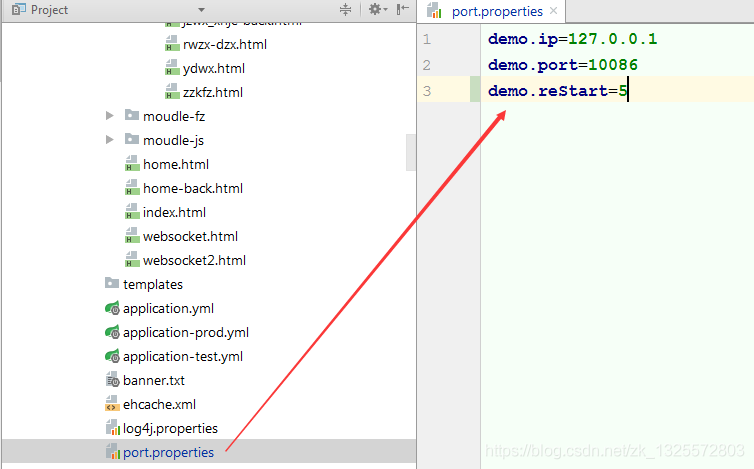
SpringBoot读取配置文件,赋值给静态变量 SpringBoot读取配置文件,赋值给静态变量方法一:xml通过bean注入{lamp/}方法二:使用set方法注入1、配置文件2、赋值静态变量—注意set函数的写法@Component @PropertySource({"classpath:port.properties"}) public class IpPortConfig { public static String ip; public static int port; public static int reStart; @Value("${demo.ip}") public void setIp(String ip) { this.ip = ip; } @Value("${demo.port}") public void setPort(int port) { this.port = port; } @Value("${demo.reStart}") public void setReStart(int reStart) { this.reStart = reStart; } }3.属性名和set方法名不必一致方法三:通过中间变量赋值import javax.annotation.PostConstruct; import org.springframework.beans.factory.annotation.Value; import org.springframework.stereotype.Component; @Component public class Test { public static String url = "/dev/xx"; @Value("${url}") public String tempUrl = "/dev/xx"; @PostConstruct public void init() { url = tempUrl; } }{card-describe title="1.@PostConstruct说明"}被@PostConstruct修饰的方法会在服务器加载Servlet的时候运行,并且只会被服务器调用一次,类似于Serclet的inti()方法。被@PostConstruct修饰的方法会在构造函数之后,init()方法之前运行。{/card-describe}{card-describe title="2.@PreConstruct说明"}被@PreConstruct修饰的方法会在服务器卸载Servlet的时候运行,并且只会被服务器调用一次,类似于Servlet的destroy()方法。被@PreConstruct修饰的方法会在destroy()方法之后运行,在Servlet被彻底卸载之前。(详见下面的程序实践){/card-describe}
-
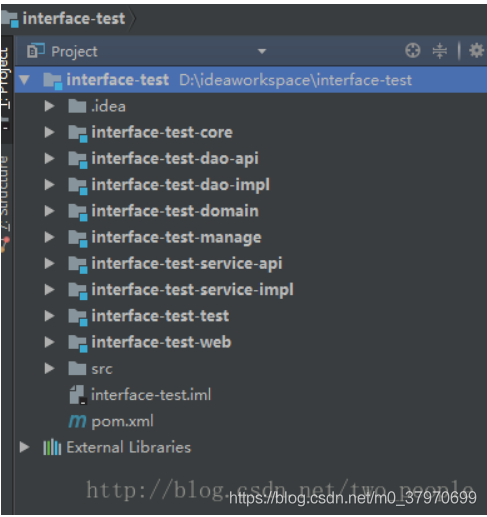
maven出现:Failed to execute goal on project ...: Could not resolve dependencies for project ... 1、我的项目结构是一个父项目,多个子项目目录如下:2、我这里就举个例子,所以应用的也就是core和domain这两个项目。3、两个项目都继承父项目4、在模块中domain依赖于core,在core中执行完clean和install之后,本地仓库也存在依赖,但是在domain中进行install就会出现Failed to execute goal on project ...: Could not resolve dependencies for project ... 这样的错误,最后发现原来是自己没有首先对父项目也就是interface-test项目进行clean和install ,5、总结、在父项目下有的子项目在首次运行clean 和install前应该先运行父项目的clean和install.直接对父项目打包,即可完成所有子项目打包


您的IP: